Berry Merry
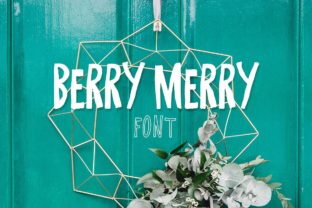
Imagine a font that doesn’t just sit quietly on the page—but wobbles with joy, radiates warmth, and invites attention without shouting. That’s Berry Merry: a cheerful, all-caps display typeface designed to spark delight in print and digital projects alike. It comes in two clean, intentional styles—Solid and Outline—giving you flexibility without sacrificing personality. Whether you’re designing a handmade jam label, a playful blog header, an invitation for a baby shower, or even a bold book cover, Berry Merry delivers charm that feels intentional, not accidental.
It’s Not Just “Cute”—It’s Purpose-Built
Many people first notice Berry Merry because it looks fun—and it is. But its real strength lies in its thoughtful construction: generous spacing, consistent weight distribution, and a gentle, rhythmic wobble that reads clearly at medium to large sizes. That means it works best where impact matters—not body text, not tiny captions, not dense infographics. Confusing it with a multipurpose workhorse font (like a sans-serif for UI or a serif for long-form reading) is the most common misstep. When used outside its sweet spot—say, as a website navigation font or in a legal disclaimer—it loses legibility and undermines professionalism.
Outline Isn’t Automatically “Better”—It Depends on Your Background
The Outline version of Berry Merry is often assumed to be more versatile—especially for layering or cutting machines. But unless your background is light and uncluttered, or your material is opaque and solid-colored, thin outlines can vanish, blur, or fail to cut cleanly. One small business owner ordered 500 custom stickers using the Outline style over a textured kraft paper background—only to find the letters nearly disappeared in daylight. A better choice? Solid on light backgrounds, Outline only when paired with high-contrast, flat-color backdrops (think white cardstock, navy vinyl, or clean digital banners). Always test at actual size and in context—not just in your font menu.
Don’t Skip Kerning—Especially With All-Caps Playfulness
Berry Merry’s wobble adds character, but it also means letterforms interact differently than rigid geometric fonts. “WOW” might look perfectly balanced in preview mode—but in practice, the wide “O” can visually crowd the narrower “W” before and after it. Auto-kerning in design apps often misses these subtleties. If you’re making a logo, product tagline, or social media banner, manually adjust spacing between pairs like “AV”, “TO”, “LL”, and “WA”. Even 10–20 units of adjustment can transform “busy” into “bouncy and polished.”
Download ≠ Ready to Use—Check What You Actually Get
Some marketplaces bundle Berry Merry with extra graphics (berries, leaves, borders) or alternate characters—but others sell only the basic uppercase alphabet, no numbers or punctuation. If you need “$24.99” on a price tag or “Happy Birthday!” with an exclamation point, verify the character set *before* purchase. One educator bought Berry Merry for classroom posters, only to discover the download lacked question marks and numerals—forcing last-minute redesigns. Reputable vendors list full glyph coverage; if it’s not visible on the product page, email support and ask. Better yet, download a free trial (if offered) and type out your most common phrases.
What to Test Before Finalizing Any Project
- Print proof at scale: A 12-pt Berry Merry headline on screen looks energetic; at 12-pt on matte paper, it may feel thin or fragile. Print a physical sample at final size and substrate.
- Color contrast: Berry Merry’s rounded forms absorb light differently than sharp-edged fonts. Test your chosen color combo with online tools like WebAIM’s Contrast Checker—especially if accessibility matters (e.g., event signage, educational handouts).
- Cutting or embossing specs: If using with a Cricut, Silhouette, or foil-stamping vendor, confirm whether your file format (OTF vs. TTF) and outline method (expand appearance vs. live font) meet their requirements. Some vendors reject fonts with complex paths—Berry Merry’s smooth curves are usually fine, but always double-check.
It’s Not Meant to Be Everywhere—And That’s Its Power
Because Berry Merry carries so much expressive weight, overusing it dilutes its effect. Slapping it across every slide in a pitch deck, every button on a landing page, or every chapter title in a 300-page ebook turns charm into noise. Instead, treat it like a signature ingredient: use it once per spread, for one key message—“NEW FLAVOR”, “YOU’RE INVITED”, “THANK YOU”—and pair it with a calm, highly legible companion (like Montserrat, Lora, or Inter). That contrast makes Berry Merry shine *and* keeps your overall design trustworthy and scannable.
Avoid the “Free Font Trap” With Similar Styles
You’ll find dozens of “berry-themed” or “wobbly script” fonts labeled “free for personal use”—but many lack proper spacing, contain broken glyphs, or embed tracking code. Worse, some mimic Berry Merry’s spirit but skip critical OpenType features (like stylistic alternates or language support), leading to awkward line breaks or missing accents in bilingual projects. If you’re building a brand—especially one that may scale—invest in the official Berry Merry license. It includes updates, commercial rights, and direct creator support. The cost is modest; the peace of mind (and consistency across platforms) is worth far more.
Think Beyond “Fun”—Think Function First
Berry Merry excels when its personality serves your goal—not overshadows it. A bakery uses it for cupcake box labels because “Sweet & Sunny” feels tangible and joyful. A therapist uses it sparingly on a workshop flyer (“You Belong Here”)—not for clinical intake forms. A children’s author chose it for chapter headings, then switched to a clear, friendly sans-serif for dialogue. In each case, the font supports meaning instead of competing with it.
So go ahead—enjoy the wobble. Print something bright. Design something warm. But do it with intention: know where Berry Merry thrives, respect its limits, and let its happiness amplify your message—not replace it.