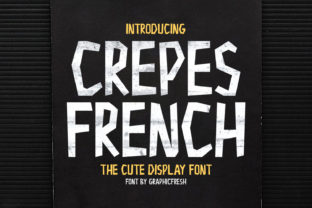
Crepes: A Fun Display Font with Expressive Ink Strokes
Crepes is a free, open-source display typeface designed for visual impact rather than extended reading. Its defining characteristic is a lively, hand-drawn aesthetic—reminiscent of brush or fountain pen ink strokes—with subtle irregularities in weight, taper, and curvature. Unlike text fonts optimized for legibility at small sizes or on screens, Crepes prioritizes personality and energy. It’s not intended for body copy, captions, or interface labels; instead, it serves best where attention, tone, and stylistic cohesion matter most.
Why Consider Crepes?
Designers and developers often seek typefaces that reinforce brand voice or elevate a specific moment in a layout. Crepes appeals to those looking for an informal, approachable, or artisanal feel—especially in contexts where playfulness, creativity, or handmade authenticity align with project goals. Its stroke variation and organic rhythm can evoke sketchbook spontaneity, café signage, or indie publishing. Users drawn to fonts like Comic Neue, Amatic SC, or Patrick Hand may find Crepes a fresh alternative with more nuanced texture and less cartoonish exaggeration.
Key Benefits
- Distinctive character: Each glyph carries slight variations, avoiding mechanical uniformity and supporting expressive, human-centered design.
- Open licensing: Released under the SIL Open Font License, Crepes is free for commercial and personal use—including web embedding, app integration, and print—without attribution requirements.
- Lightweight file size: The single-weight, single-style format keeps the font file compact (under 50 KB), minimizing performance impact when self-hosted.
- Web-friendly implementation: Works reliably across modern browsers using standard
@font-facedeclarations or via Google Fonts (where available).
Tradeoffs and Practical Considerations
Crepes’ strengths are tightly linked to its limitations. Its high-contrast strokes and variable width reduce legibility below ~24px, especially in low-resolution environments or on mobile devices with reduced contrast. It lacks italics, bold variants, or extended language support beyond basic Latin characters—making it unsuitable for multilingual interfaces or typographic hierarchy requiring weight contrast.
Accessibility is another important factor. Because Crepes doesn’t conform to WCAG contrast or readability guidelines for body text, it should never be used for essential information such as form labels, navigation links, or legal disclaimers. Screen readers interpret it correctly, but visual accessibility relies heavily on proper semantic HTML pairing—e.g., using for headings set in Crepes while ensuring supporting content uses accessible system or web-safe fonts.
Also consider rendering consistency. While modern browsers handle OpenType features well, older versions—particularly on Windows—may flatten subtle stroke details or introduce minor spacing inconsistencies. Testing across target devices and OS versions remains advisable.
When Crepes Is a Strong Fit
Crepes excels in controlled, intentional applications. It works well for short-form display use: website headlines, event posters, product packaging accents, social media banners, or editorial feature titles where tone and visual identity take priority over dense information delivery. For example, a local bakery launching a seasonal menu might use Crepes for the “Summer Berry Crepes” headline alongside clean sans-serif body text—leveraging the font’s thematic resonance without compromising readability.
Brands with youthful, craft-oriented, or community-focused positioning may find Crepes reinforces messaging around authenticity and approachability. Similarly, educational platforms targeting younger audiences—or creative portfolios aiming to signal artistic fluency—can use it sparingly to differentiate key sections without overwhelming users.
When to Explore Alternatives
If your project requires typographic flexibility—such as multiple weights, narrow or condensed variants, or robust international character sets—Crepes won’t meet those needs. In those cases, fonts like Montserrat (for clean versatility), Playfair Display (for elegant contrast with strong readability), or Quicksand (for friendly, rounded readability at larger sizes) offer broader utility.
For projects emphasizing accessibility compliance or strict readability standards—such as government services, healthcare portals, or academic publishing—prioritize fonts engineered for clarity across conditions. Even within the display category, options like EB Garamond (with optical sizing) or Raleway (with excellent hinting) provide stronger baseline legibility while retaining distinctiveness.
Finally, if your workflow depends on advanced OpenType features—stylistic sets, ligatures, or contextual alternates—Crepes offers none. Fonts like Inter (with extensive variants) or Recursive (a variable font with built-in coding and display modes) deliver greater technical depth for complex typographic systems.
Making a Practical Decision
Before choosing Crepes, ask three questions:
- What role does typography play in this project? If it’s primarily functional (e.g., conveying instructions, data, or navigation), Crepes is unlikely to serve core needs effectively.
- How much control do you have over context? Crepes performs best when paired intentionally—e.g., large headings over ample whitespace, with generous line height and high-contrast backgrounds. If constraints limit layout flexibility (e.g., tight grid systems or dynamic content containers), test how it scales and wraps before committing.
- Who is the primary audience—and what do they need from the text? Prioritize clarity and inclusion. If users include people with low vision, dyslexia, or non-native language proficiency, reserve Crepes for decorative or secondary roles only.
Download and test Crepes early in your design process—not just visually, but functionally. Import it into your CSS, apply it to real content blocks, and review it on actual devices. Compare it side-by-side with fallback fonts to assess hierarchy, rhythm, and perceived tone. Use browser developer tools to verify loading behavior and inspect computed styles.
Remember: type choice is rarely about “best” and more often about “most appropriate.” Crepes isn’t a universal solution—but for the right context, it adds warmth, distinction, and intentionality that few display fonts match so economically.