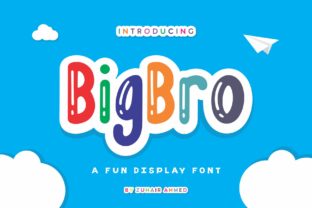
BigBro: A Whimsical, Child-Friendly Display Font
If you’ve ever scrolled through a font library and paused—not because something looked polished or sleek, but because it made you smile—chances are you felt the quiet magic of BigBro. It’s not just another playful typeface. BigBro is an authentically hand-drawn display font that balances childlike wonder with thoughtful design discipline. Its curves feel warm, its spacing generous, and its personality unmistakable—yet it never sacrifices legibility or purpose.
Why BigBro Stands Out in a Crowded Field
Most display fonts lean hard into either nostalgia or novelty—and often sacrifice usability in the process. BigBro avoids that trap. Its letterforms are rounded but not overly soft; its baseline rhythm is consistent without feeling mechanical. Each character carries subtle irregularities—the kind you’d see in confident chalkboard writing or a well-loved storybook illustration. That authenticity isn’t accidental. It’s the result of deliberate craftsmanship, not algorithmic “quirkiness.”
What makes BigBro especially useful for professionals? It’s intentionally restrained. Unlike many whimsical fonts that collapse at larger sizes or vanish in small contexts, BigBro holds up remarkably well across scale—from bold 120pt headlines to 24pt section titles in digital interfaces. Its x-height is generous, counters are open, and stroke contrast is low enough to keep reading comfortable—even for younger eyes or neurodiverse audiences.
Where BigBro Fits in Real Workflows
You don’t need to be designing a nursery rhyme app to benefit from BigBro. Its versatility shines in settings where warmth, clarity, and approachability matter—without veering into cutesy territory.
- Educators and curriculum designers use BigBro for classroom posters, learning cards, and early-literacy materials—especially where visual scaffolding supports comprehension (e.g., blending sounds in phonics charts or labeling science diagrams).
- Small business owners choose BigBro for café chalkboard menus, handmade product tags, and local event signage. It signals friendliness and care—not corporate polish—and resonates with community-driven branding.
- Bloggers and content creators apply it selectively: as a hero-font for newsletter headers, podcast episode titles, or Instagram carousel covers. Paired with a clean sans-serif like Inter or Open Sans, it creates visual hierarchy without competing for attention.
- Nonprofits and advocacy groups find it effective for campaigns targeting families or youth—think after-school program flyers, inclusive workshop handouts, or accessibility-focused resource kits. Its openness feels inviting, not infantilizing.
A Note on Tone and Context
BigBro doesn’t shout. It leans in. That means it works best when used with intention—not as background noise, but as a deliberate voice. Overusing it (say, for full paragraphs or navigation menus) dilutes its charm and strains readability. Think of it like a favorite spice: essential in the right measure, overwhelming if overapplied.
Designing With BigBro: Practical Tips
Start simple. Try BigBro for one high-impact element per layout: a headline, logo lockup, or call-to-action button. Then step back. Does it feel cohesive—or does it clash with your brand’s existing tone? If you’re pairing it with another font, prioritize contrast in function, not just form. For example:
- Use BigBro for headings and a neutral, highly legible sans-serif (like Roboto or Lato) for body text.
- Avoid pairing it with other decorative or script fonts—its personality needs room to breathe.
- In digital interfaces, test line-height carefully. BigBro benefits from slightly more vertical space than typical display fonts—try 1.3–1.5× font size for optimal rhythm.
- When exporting for web, serve it as a variable font if available—or at minimum, include WOFF2 for performance. It’s lightweight by design, but loading strategy still matters.
Accessibility Considerations You Can’t Skip
BigBro’s child-friendly nature makes it appealing for inclusive design—but appeal isn’t enough. Always verify contrast ratios against WCAG guidelines, especially when using lighter weights or pastel backgrounds. Its rounded terminals and open counters support readability for emerging readers and some dyslexic users, but never assume universal fit. Test with real people: ask a 7-year-old to read a sample aloud, or share a mockup with educators who work daily with diverse learners.
When BigBro Might Not Be the Right Choice
It’s honest to say BigBro isn’t universal. Avoid it for formal legal documents, financial dashboards, technical documentation, or anything requiring strict neutrality or gravitas. Its warmth can unintentionally undercut seriousness. Likewise, steer clear in multilingual projects unless you’ve verified glyph coverage—BigBro was designed primarily for English, with strong Latin-1 support, but may lack extended diacritics or non-Latin scripts.
And while it’s optimized for display use, don’t force it into UI components that demand precision: tab labels, form inputs, or data tables will suffer. Its strength lies in moments of human connection—not functional density.
Final Thought: Fonts Are Tools, Not Trends
BigBro endures because it serves a real need: bridging playfulness and professionalism without compromise. It reminds us that good typography isn’t about following trends—it’s about matching voice to audience, intention to execution. Whether you’re launching a Montessori-inspired app, rebranding a family-run bakery, or designing a summer camp brochure, BigBro offers something rare: joy with integrity.
If you’re evaluating fonts for an upcoming project, give BigBro a focused test. Set two versions of the same headline—one in your current font, one in BigBro. Show both to three people who match your target audience. Ask what emotion each evokes, what they’d expect to find beneath it, and which feels more trustworthy. The answers often reveal more than any spec sheet.