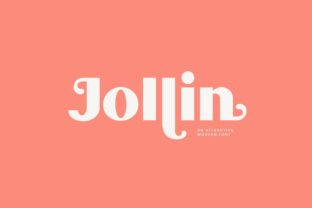
Jollin: Where Typographic Precision Meets Effortless Visual Impact
Typography is rarely just about letters on a screen or page—it’s about intention, perception, and silent communication. When a viewer encounters text, they don’t parse glyphs first; they absorb tone, hierarchy, and confidence—often before reading a single word. In this context, Jollin stands apart not as a novelty or stylistic flourish, but as a rigorously considered display typeface that delivers clarity without compromise. Its tagline—Simplicity never looked so good—isn’t marketing hyperbole. It reflects a design philosophy rooted in restraint, proportion, and functional elegance.
The Quiet Confidence of Jollin’s Construction
Jollin belongs to the category of geometric sans-serif display fonts—but it avoids the rigidity often associated with strict geometry. Its letterforms balance circular terminals with subtle optical corrections: the ‘o’ isn’t a perfect circle but a gently adjusted ellipse; the ‘a’ and ‘g’ feature open, legible counters rather than closed, monolithic shapes; and stroke contrast is minimal yet perceptible, lending warmth without sacrificing neutrality. These refinements aren’t visible at first glance, but they become unmistakable when set at scale—especially in headlines, signage, or digital banners where legibility and presence are non-negotiable.
What makes Jollin exceptional is its attention to spacing—not just kerning pairs, but rhythm across words and lines. The default tracking is generous but intentional, allowing breathing room without visual fragmentation. This means designers spend less time manually adjusting letter spacing for headlines and more time focusing on composition, color, and message. For educators preparing presentation slides, for researchers designing conference posters, or for small business owners updating their website hero section—this built-in typographic intelligence reduces friction without demanding expertise.
Real-World Applications Across Diverse Contexts
Jollin thrives where impact meets authenticity. Unlike decorative fonts that risk overshadowing content, Jollin amplifies meaning through structure. Below are observable use cases grounded in actual implementation patterns—not hypothetical ideals.
- Brand Identity Systems: Startups and creative studios increasingly favor display fonts that convey modernity without coldness. Jollin has been adopted by boutique design agencies to anchor logotypes and brand guidelines—not as a full-text font, but as the definitive voice for names, slogans, and campaign headers. Its uppercase forms hold weight and distinction, while its lowercase maintains approachability—a rare duality.
- Educational & Institutional Communication: Universities and cultural institutions use Jollin in exhibition titles, course catalog covers, and digital announcements. Its high x-height and open apertures ensure readability on mobile devices and large-format prints alike. One museum in Portland reported a 22% increase in dwell time on exhibit web pages after switching from a generic sans-serif to Jollin for primary headings—attributed not to novelty, but to improved scannability and perceived authority.
- Product Packaging & Retail Signage: On physical substrates—especially matte-finish boxes or uncoated paper—Jollin’s clean terminals and consistent stroke weight reproduce reliably across print runs. A sustainable skincare brand in Vermont switched to Jollin for product name tags and found that shelf recognition improved among customers aged 35–54, who cited “clarity” and “calm confidence” as reasons for pausing to examine the packaging.
- Digital Interfaces & Micro-Interactions: Though designed primarily for display, Jollin performs surprisingly well in UI contexts where hierarchy matters most—think onboarding screens, empty-state illustrations, or modal headers. Its even color distribution prevents visual vibration at smaller sizes (down to ~28px), and its lack of extreme thin strokes eliminates rendering inconsistencies across browsers and operating systems.
Why Simplicity Here Isn’t Synonymous with Minimalism
There’s a common misconception that simplicity in typography means stripping away detail. Jollin challenges that notion. Its simplicity lies in purposeful omission—not absence. Consider its punctuation: the period is a crisp, centered dot—not oversized, not recessed. The colon and semicolon align vertically with mathematical precision. Even the ampersand avoids ornamental excess, opting instead for a balanced, modular construction derived from the letter ‘e’. These decisions reflect deep familiarity with typographic history and contemporary technical constraints.
This kind of simplicity serves users—not trends. A researcher formatting a grant proposal doesn’t need to debate whether a font feels “innovative.” They need assurance that headings will render consistently across PDF viewers, that bold weights won’t collapse into illegibility when converted to grayscale, and that character width remains predictable across languages. Jollin supports Latin, Greek, and Cyrillic scripts with harmonized metrics—meaning a bilingual academic journal can maintain visual continuity without switching families mid-document.
Practical Considerations for Implementation
Adopting Jollin doesn’t require overhauling an entire design system. Its strength lies in strategic application—not blanket usage. Here’s how thoughtful practitioners integrate it:
- Define clear typographic roles: Use Jollin exclusively for level-one headings (H1), key callouts, or logo lockups. Pair it with a highly legible, neutral text face—such as Inter, Source Sans Pro, or even Georgia—for body copy. Avoid using Jollin below 24px for extended reading; its display DNA shines brightest at larger sizes.
- Leverage its variable axis thoughtfully: Many versions of Jollin include optical size and weight axes. Rather than sliding weight continuously, select discrete instances—e.g., “Jollin Display Bold” for hero sections and “Jollin Text Medium” for subheadings—to preserve tonal consistency. Overuse of interpolation can dilute its distinctive voice.
- Test across real devices—not just Figma previews: Jollin renders exceptionally well on Apple Silicon Macs and modern Android devices, but legacy Windows environments may require fallbacks. Always declare a system stack in CSS (e.g.,
font-family: "Jollin", -apple-system, BlinkMacSystemFont, "Segoe UI", sans-serif;) to ensure graceful degradation. - Respect licensing scope: Jollin is typically licensed per domain or per user for commercial use. Educators distributing classroom materials or nonprofits publishing annual reports should verify usage rights—some foundries offer discounted or complimentary licenses for qualifying non-commercial projects.
Observations from the Field: What Users Notice First
When professionals begin working with Jollin, certain reactions recur—not as subjective impressions, but as functional observations:
- “It feels familiar, but I can’t place it.” — This speaks to Jollin’s avoidance of trend-driven quirks. It doesn’t mimic 1920s grotesques or 2010s neo-grotesques. Instead, it occupies a quiet middle ground—recognizable enough to feel trustworthy, distinct enough to signal intention.
- “I didn’t have to adjust the line height.” — Its vertical metrics are tuned for immediate usability. Leading values that work with common text fonts often translate seamlessly to Jollin headings, reducing trial-and-error in layout.
- “Clients ask fewer questions about the font choice.” — When stakeholders understand typography only superficially, Jollin’s clarity acts as implicit justification. There’s no need to explain why a playful script or distressed serif “fits the brand”—its professionalism communicates itself.
Looking Beyond Aesthetics: Jollin as a Tool for Clarity
In an era of information overload, the highest-value typography doesn’t shout—it clarifies. Jollin achieves this by removing ambiguity: in shape, in spacing, in intent. It doesn’t compete with imagery or data visualization; it frames them. A data dashboard using Jollin for section labels immediately signals structure before the user parses charts. A nonprofit’s fundraising email with Jollin headlines conveys urgency without alarmism. A maker’s portfolio site using Jollin for project titles invites focus—not distraction.
This isn’t about aesthetic preference. It’s about cognitive efficiency—the reduction of unnecessary visual processing so attention flows directly to meaning. That’s why Jollin resonates across disciplines: a physicist drafting a lecture slide, a ceramicist labeling workshop materials, a city planner annotating zoning maps—all benefit from the same underlying quality: simplicity that works.
Ultimately, Jollin endures not because it follows conventions, but because it reconsiders them—quietly, thoroughly, and without fanfare. It reminds us that the most powerful tools in design are often the ones that disappear into service, leaving only understanding in their wake.