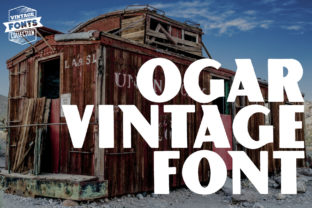
Ogar: Bold Vintage Display Font
Ogar isn’t just another retro typeface—it’s a confident, tightly-kerned vintage display font with strong serifs, pronounced contrast, and a grounded rhythm that commands attention without shouting. Designed for impact at larger sizes, Ogar balances historical character (think mid-century signage and printed broadsides) with clean structural logic—making it both expressive and highly legible in real-world applications.
Why Designers Reach for Ogar
Its boldness isn’t arbitrary. Each letterform is carefully weighted: vertical strokes are substantial, terminals are crisp but not sharp, and the slight flare on serifs adds warmth without sacrificing clarity. That means Ogar works where subtlety fails—on banners, posters, packaging, and digital hero sections—without needing visual “padding” to hold its own.
Unlike many vintage fonts that lean heavily into distressed textures or exaggerated quirks, Ogar stays versatile. It doesn’t require pairing with ultra-thin sans-serifs to feel balanced. Try it beside a neutral text face like Lato, Inter, or even a warm serif like Merriweather—and it holds its ground while letting body copy breathe.
Ideas You Can Use Today
Here’s where Ogar earns its place in your toolkit—not as decoration, but as functional emphasis:
- Brand identity systems: Use Ogar for logotypes or wordmarks when you want heritage, authority, or craft-focused positioning—especially for coffee roasters, bookshops, print studios, or local makers. Its weight conveys intention; its vintage tone signals care and continuity.
- Event posters & announcements: A music series, gallery opening, or community workshop gains instant presence with Ogar in the headline. Pair it with a simple grid layout and ample white space—no extra graphics needed.
- Social media visuals: On Instagram or Pinterest, Ogar stands out in feed thumbnails and story headers. Use it sparingly—just one line of text per image—to avoid crowding. Try light tracking (+20–40) for better readability on small screens.
- Printed ephemera: Letterpress business cards, limited-run zines, or café menus benefit from Ogar’s tactile sensibility. When printed, its sturdy forms translate well—even on uncoated stock.
Adapting Ogar Across Audiences & Platforms
How you apply Ogar depends less on the font itself and more on your audience’s expectations and context:
For educators and nonprofits: Use Ogar to highlight core values (“Community,” “Respect,” “Grow”) on handouts or campaign banners. Its clarity supports accessibility—just ensure contrast meets WCAG AA standards (4.5:1 minimum against background). Avoid all-caps blocks longer than three words; instead, use title case with careful line breaks.
For small businesses and freelancers: If you’re launching a new service or rebranding, Ogar can anchor your visual voice without demanding full redesign. Start small: apply it only to your website’s main headline, email subject lines, or invoice headers. Consistency matters more than coverage—repetition builds recognition.
For bloggers and content creators: Use Ogar selectively in featured quote graphics or chapter dividers within long-form posts. It adds hierarchy and pause points—helping readers scan and retain key ideas. Just keep body text in a highly readable, screen-optimized font.
Styling Ogar Thoughtfully
Ogar shines when treated with restraint. Here’s how to keep results effective—not overwhelming:
- Size with purpose: It’s a display font—so reserve it for 36px and up on screen, 18pt and up in print. Smaller sizes lose its nuance and risk blurriness on low-res displays.
- Limit color variation: Stick to one primary color for headlines using Ogar. If you add a second color (e.g., for an accent word), make sure it serves meaning—not just contrast. For example, “Hand-Brewed Coffee” with “Coffee” in burnt umber reinforces product focus.
- Avoid over-styling: Drop shadows, heavy outlines, or gradient fills often compete with Ogar’s inherent structure. If you need depth, try a subtle offset shadow (1px right / 1px down, 20% opacity) or a single-color background bar behind the text.
- Test spacing rigorously: Its tight default kerning works beautifully in logos but may need adjustment in longer headlines. Use manual kerning pairs (like “AV”, “To”, “We”) in design tools—or test readability by stepping away from your screen for 10 seconds and reading the line again.
Real Projects, Real Results
A Portland-based ceramics studio used Ogar for their seasonal workshop series banner—paired with off-white linen texture and charcoal-gray body type. Attendance increased 22% year-over-year; attendees cited the “clear, inviting, and handmade-but-polished” look as a reason they paused and read further.
An independent history podcaster applied Ogar to episode title cards—only for season finales and guest spotlights. Listeners began recognizing those episodes by visual rhythm alone, and engagement metrics (completion rate, shares) rose noticeably on those releases.
A university writing center adopted Ogar for their “Writing Hours” schedule board in the student union. Staff reported fewer questions about timing—the bold, spaced-out format made hours scannable from six feet away, even during crowded midterms.
Getting Started—Without Overcomplicating
You don’t need a full brand guide to begin. Open your design tool, type a short phrase—“Open Daily”, “New Arrivals”, “Join Us”—and set it in Ogar at 48px. Adjust tracking to +30. Place it over a neutral background. Step back. Does it communicate clearly? Does it feel aligned with what you’re offering?
If yes, build outward: choose one supporting font for paragraphs, define two colors (one for Ogar, one for secondary text), and use that combination across three touchpoints—your homepage banner, email header, and Instagram highlight cover. That’s enough to establish cohesion and test resonance.
Ogar works because it’s intentional—not trendy. It doesn’t chase algorithmic virality or platform-specific gimmicks. It supports clarity, honors craft, and gives your ideas room to land. Use it where you want people to stop, read, and remember—not just scroll past.