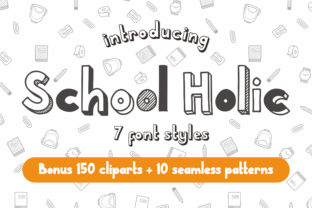
School Holic Family: A Whimsical Yet Purposeful Typography Tool for Real-World Workflows
School Holic Family isn’t just another display font—it’s a set of seven distinct, hand-crafted styles designed to bring clarity, charm, and personality to visual communication without sacrificing function. Each style—ranging from bold chalkboard-inspired outlines to delicate cursive scripts and playful monoline variants—serves a specific expressive purpose while maintaining consistent proportions, spacing logic, and character sets. That consistency is what makes School Holic Family uniquely suited for integration into professional workflows where tone, timing, and typographic harmony matter.
Where It Fits in the Creative and Operational Process
Typography doesn’t exist in isolation. It enters the process at multiple points—not just as a final polish, but as an early signal of intent. School Holic Family works most effectively when selected deliberately during the planning phase of a project—not after layout is locked, but before mood boards are finalized or brand guidelines are drafted. For educators designing lesson slides, marketers crafting social campaigns, or small business owners refreshing their packaging, choosing one or two complementary styles from the family early helps unify visual language across touchpoints.
Unlike system fonts or generic sans-serifs, School Holic Family carries tonal weight. Its whimsy signals approachability; its structure supports legibility. That duality means it can anchor both playful learning materials and polished product launches—provided it’s used with intention. Think of it less as decoration and more as a strategic layer in your communication stack: part of the same decision-making chain that includes audience analysis, platform constraints, content hierarchy, and accessibility checks.
Integration Before, During, and After Execution
Before execution: Use School Holic Family to prototype tone. Drop a headline in “School Holic Chalk” alongside body text in a neutral sans-serif to test how warmth and authority balance. Preview how “School Holic Script” reads at 24px on mobile versus desktop—this informs responsive design decisions before coding begins. When briefing a designer or developer, specifying which variant you’ve chosen (e.g., “School Holic Bold Outline for section headers, School Holic Light for pull quotes”) reduces revision rounds and aligns expectations.
During execution: The family’s seven styles map cleanly to common content roles: headlines, subheads, callouts, quotes, labels, buttons, and decorative accents. Because all weights share the same x-height, baseline alignment, and kerning logic, swapping between them mid-project rarely breaks layout flow. This predictability supports agile iteration—especially useful for freelancers managing tight deadlines or educators updating course materials weekly. No need to re-adjust line heights or letter-spacing each time you switch from “School Holic Block” to “School Holic Dotted.”
After execution: Consistency becomes measurable. Audit live assets—email templates, slide decks, printed handouts—and verify that only the intended variants are deployed. Overuse dilutes impact; underuse misses opportunities for visual rhythm. A simple checklist helps: Is the same style used for all primary CTAs? Are script variants reserved for human-centered messages (e.g., welcome notes, feedback prompts), not functional UI labels? These aren’t arbitrary rules—they’re quality control steps rooted in how people scan, interpret, and emotionally respond to type.
Compatibility and Practical Constraints
School Holic Family is built for modern environments: OpenType features include stylistic alternates, ligatures, and multilingual support (Latin, Greek, Cyrillic). It renders cleanly across browsers, CMS platforms like WordPress and Squarespace, and design tools including Figma, Adobe Illustrator, and Canva. However, performance matters—especially if embedding all seven files. For web use, load only the variants you need. Most projects benefit from just three: one bold display style, one medium-weight option for subheads, and one light or script variant for emphasis.
Print workflows demand attention to file format and embedding. When exporting PDFs for print, embed fonts fully and confirm glyph coverage matches your copy (e.g., check for accented characters if publishing bilingual materials). For physical signage or merchandise, test “School Holic Outline” at large scale—it holds detail well, but avoid ultra-thin strokes below 18pt in low-resolution output.
Workflow Examples Across Roles
- Educators: Use “School Holic Chalk” for slide headers and “School Holic Dotted” for vocabulary lists. The tactile texture reinforces learning themes without distracting from content. Prep once, reuse across units—store presets in your presentation software to maintain consistency term after term.
- Small business owners: Pair “School Holic Block” for storefront signage with “School Holic Script” for handwritten-style thank-you cards. This creates continuity between public-facing branding and personal customer touchpoints—no extra design work needed.
- Bloggers and content creators: Assign “School Holic Bold Outline” to article titles and “School Holic Light” to pull quotes. The contrast draws attention without competing with body text. Save these as paragraph styles in your editor or CMS to enforce uniformity across posts.
- Freelance designers: Include School Holic Family in your starter kits—pre-configured Figma libraries or InDesign templates—with clear usage notes. Clients appreciate guidance on *how* to extend the typography beyond your deliverables, reducing follow-up requests.
Long-Term Usability and Quality Control
Fonts age like any tool—what feels fresh in Q1 may feel overused by Q4. School Holic Family avoids trend fatigue through versatility: its styles don’t rely on fleeting aesthetics like exaggerated serifs or distorted proportions. Instead, they lean into timeless qualities—clarity, rhythm, and human gesture. To sustain freshness, rotate variants seasonally (e.g., “School Holic Dotted” for spring campaigns, “School Holic Bold Outline” for fall launches) rather than abandoning the family entirely.
Track usage across projects. Keep a lightweight log: which variant was used, where, and why. Over time, patterns emerge—maybe “School Holic Script” consistently performs better in email subject lines, or “School Holic Chalk” converts higher on landing pages. That data informs future decisions and strengthens your typographic intuition.
Accessibility is non-negotiable. While School Holic Family is legible at recommended sizes, avoid using script variants for critical information like instructions or legal disclaimers. Always pair display styles with highly readable body fonts (e.g., Inter, Lato, or Georgia) and verify color contrast meets WCAG 2.1 AA standards. Tools like Stark or axe DevTools help automate this check during development.
Getting Started Without Overcomplication
You don’t need to master all seven styles at once. Start with one: identify the single most frequent use case in your current work—perhaps newsletter headers, workshop handouts, or product feature tags—and pick the variant that best supports that goal. Test it for one week across real outputs. Note where it enhances clarity and where it creates friction (e.g., slow rendering, inconsistent spacing). Adjust based on observation—not theory.
Then expand intentionally. Add a second variant only when you have a distinct role for it—one that improves scannability, emotional resonance, or brand cohesion. Avoid adding for novelty alone. Every additional style introduces maintenance overhead; every intentional pairing compounds value.
School Holic Family earns its place not by being everywhere, but by being *right there*—when tone needs lifting, when hierarchy needs softening, when professionalism and playfulness must coexist. It’s a tool for people who plan carefully, execute deliberately, and refine continuously. Used this way, it doesn’t just sit on a page—it supports the work happening around it.