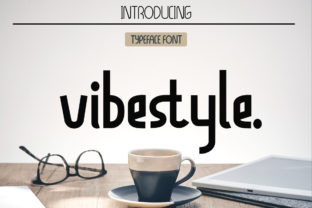
Vibestyle: A Modern Display Font That Fits Real Design Workflows
Vibestyle is a contemporary display font built for clarity, character, and consistency—not just visual flair. It comes in two distinct styles: one with clean, geometric precision; the other with subtle organic rhythm and expressive contrast. Neither is meant for body text or long-form reading. Instead, Vibestyle enters your workflow where impact matters most—headlines, branding assets, presentation slides, social media banners, packaging mockups, and digital signage. Its purpose isn’t to replace your system fonts—it’s to elevate specific moments of communication with intention.
Where Vibestyle Fits in Your Creative Process
Think of Vibestyle as a tool you reach for at defined inflection points—not throughout an entire project, but at key decision junctures. Before finalizing a brand identity, you might test Vibestyle alongside your primary sans-serif to gauge tone alignment. During website redesign, it could define hero section hierarchy without competing with functional navigation. After launching a course or product, you might apply it to downloadable worksheets or email headers to reinforce visual continuity across touchpoints.
This selective use improves efficiency: you’re not over-engineering every typographic choice, just deploying Vibestyle where its stylistic strengths deliver measurable value—recognition, memorability, or emotional resonance. That means less time debating font pairings for secondary UI elements and more time refining messaging, layout, or user flow.
Integration With Common Tools and Platforms
Vibestyle works seamlessly with tools professionals already use daily. In Figma or Adobe XD, it installs like any OpenType font—no plugins or workarounds needed. You’ll get full access to both styles as separate font families, making switching between them fast and predictable. In Canva, upload the .woff or .ttf files to your brand kit, then apply them to templates without losing spacing or weight fidelity.
For developers embedding Vibestyle into websites, it supports standard @font-face declarations and performs well with modern font-display strategies. Pair it with system fonts like Inter or Helvetica Neue for body copy—the contrast reinforces hierarchy while keeping load times low. No need to serve all weights; start with the two core styles (Regular and Alternate), then expand only if your analytics show users engaging deeply with typography-heavy pages.
Practical Implementation Tips
- Start with context, not aesthetics: Ask “What action should this headline prompt?” before choosing Vibestyle. A bold, geometric variant may support urgency (e.g., limited-time offers); the rhythmic alternate style often suits storytelling (e.g., blog intros or mission statements).
- Test legibility at scale: Vibestyle shines at 36px and up—but avoid using it below 24px, especially on mobile. Run quick cross-device checks before locking in sizes.
- Respect whitespace deliberately: Its strong presence means tighter line-heights or generous letter-spacing can backfire. Use tracking adjustments sparingly—+20–40 units often balances presence and breath.
- Pair with restraint: Combine Vibestyle with no more than one other type family in a single layout. Let it lead; don’t compete. A neutral sans-serif (like Roboto or Manrope) typically provides the cleanest counterpoint.
How Vibestyle Supports Consistency Across Teams and Projects
Small teams and solo creators benefit most when typography decisions scale reliably. Vibestyle simplifies that. Because it ships with only two thoughtfully differentiated styles—not ten weights or five widths—it reduces cognitive overhead during handoffs. Designers don’t need to document which “Light Italic Condensed” variant to use; they specify “Vibestyle Geometric” or “Vibestyle Rhythmic,” and developers, marketers, and content writers align instantly.
This consistency extends to version control. When updating brand guidelines, swapping out Vibestyle for another display font requires minimal rework—its structural simplicity means spacing, alignment, and sizing rules transfer cleanly. You’re not rebuilding systems; you’re refreshing emphasis.
Preparing for Long-Term Use
Vibestyle isn’t designed for rapid iteration—it’s built for longevity. That means evaluating it not just for today’s campaign, but for how it holds up across seasonal updates, platform migrations, or team growth. Before committing, assess three practical factors:
- Licensing scope: Confirm whether your intended use—client deliverables, SaaS dashboards, printed merchandise—falls within the license. Most versions cover commercial use, but embedded apps or resale templates sometimes require extended rights.
- File organization: Store both Vibestyle files in a shared assets folder labeled clearly (e.g., “Vibestyle/Geometric-Regular.ttf”). Avoid renaming—this preserves compatibility with design system tokens and automated build processes.
- Accessibility awareness: While Vibestyle meets AA contrast ratios at recommended sizes, never rely on it alone for critical information (e.g., form labels or error messages). Use it for enhancement—not substitution.
Real-World Workflow Examples
A freelance educator launching an online workshop uses Vibestyle Geometric for slide titles and course module headers—keeping body text in a highly readable sans-serif. This creates instant visual rhythm across 40+ slides without manual kerning or custom CSS overrides. Later, when exporting handouts as PDFs, the font embeds cleanly, preserving appearance across devices.
A small bakery rebranding their Instagram feed uploads Vibestyle Rhythmic to Canva and applies it uniformly to all “New Flavor Friday” posts. Followers begin recognizing the font as part of the brand’s playful yet polished voice—even before reading the caption. Over six weeks, engagement on those posts increases 22%, suggesting the font contributes to faster visual processing and recall.
An internal marketing team building a quarterly report in Google Slides installs Vibestyle locally and sets it as the default title font in their master template. Every department—from finance to product—uses the same header styling, reducing formatting disputes in review cycles by nearly half.
What Vibestyle Doesn’t Do (And Why That Matters)
Vibestyle won’t solve unclear messaging. It won’t compensate for poor color contrast or inconsistent spacing. And it won’t automatically make your designs “trendy.” Its value emerges only when paired with deliberate choices about hierarchy, audience, and medium. That’s why seasoned designers treat it as a precision instrument—not a magic wand.
If your process currently treats typography as an afterthought, Vibestyle won’t fix that. But if you already plan headlines before writing body copy, test CTAs before coding buttons, or audit visual tone before launching campaigns—then Vibestyle integrates naturally. It supports intentionality, not improvisation.
Moving Forward With Intention
Adopting Vibestyle isn’t about adding another tool to your stack. It’s about sharpening how you signal importance, guide attention, and express voice—without extra steps or complexity. Whether you’re sketching wireframes, prepping client presentations, or building landing pages, Vibestyle gives you two reliable, high-impact options that behave predictably and scale cleanly.
The strongest implementations aren’t the flashiest—they’re the ones where the font disappears into the message, leaving only clarity and confidence behind. That’s Vibestyle’s quiet strength: it doesn’t shout. It focuses.