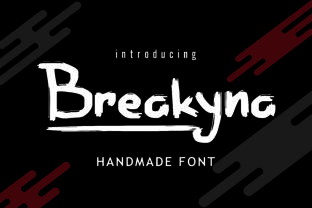
Breakyna: A Bold, Handmade Brush Font That Delivers Impact—When Used Right
Breakyna isn’t just another decorative font—it’s a confident, handmade brush typeface with deliberate texture, organic contrast, and expressive energy. Designed for visibility and personality, it stands out on posters, web headers, book covers, packaging, and branding materials where strength and character matter. But its boldness comes with practical considerations: what makes Breakyna compelling also makes it easy to misuse—especially if you’re new to typography or working under tight deadlines.
Assuming Breakyna Works Like Any Other Display Font
Many designers download Breakyna expecting plug-and-play versatility—only to discover it doesn’t scale gracefully at small sizes or pair predictably with every sans-serif. Unlike geometric display fonts built for crisp rendering across devices, Breakyna’s handmade nature means its strokes carry subtle irregularities, pressure variation, and ink-like density. That’s intentional—and beautiful—but it also means:
- It loses legibility below 36pt in print or 28px on screen, especially in body copy or UI labels.
- It doesn’t auto-hint well on low-resolution screens, so some letters may appear slightly fuzzy without manual optimization.
- Its rhythm is expressive, not mechanical—so aligning it tightly with rigid grid systems (like strict CSS flex layouts) can create unintended visual tension.
Instead of forcing Breakyna into roles it wasn’t designed for, use it where its strengths shine: as a focal point. Try pairing it with a clean, highly legible sans-serif (like Inter, Poppins, or Lato) for supporting text—and always test how it renders on actual devices before finalizing.
Overlooking Licensing and File Format Details
Breakyna is often offered in multiple weights and styles—but not all versions include OpenType features like stylistic alternates, ligatures, or multilingual support. Some free or discounted bundles only contain basic .TTF files, missing the .OTF variants needed for advanced typographic control in Adobe apps or modern CSS @font-face declarations.
Worse, users sometimes assume “free download” means “free for commercial use.” Not true. Many Breakyna variants are licensed for personal use only—or require attribution. Using an unlicensed version on a client’s product packaging, Shopify store banner, or podcast cover could lead to takedown requests or legal exposure, especially if the design gains traction.
Before downloading or purchasing, check:
- Whether the license explicitly covers your intended use (e.g., “digital ads,” “merchandise,” “SaaS interface”)
- If the package includes both .OTF and .TTF, plus web-optimized WOFF2 files
- If extended Latin, Cyrillic, or diacritic support is included—critical for global-facing brands or educational content
When in doubt, go straight to the original creator’s site or a reputable marketplace like Creative Market or MyFonts—where licensing terms are clearly stated and updates are provided.
Misjudging Color, Contrast, and Background Interaction
Breakyna’s thick, painterly strokes absorb light differently than sharp vector fonts. On dark backgrounds, its weight can feel overwhelming unless you adjust letter spacing (tracking) or reduce fill opacity slightly. On busy photos or textured backgrounds, its fine details—like tapered ends or ink bleed effects—can vanish entirely.
One freelancer recently used Breakyna over a watercolor background for a wedding invitation suite—only to find key letters indistinguishable in printed proofs. The fix? A subtle white stroke (1px) around the text, or placing it over a muted, solid-color overlay with 85% opacity.
Always preview Breakyna in context—not just in your font menu. Simulate real-world conditions: view it on mobile, zoom out to 50%, and convert to grayscale to assess contrast balance. If it feels heavy or unclear, try increasing tracking by 20–40 units or reducing weight contrast in your layout (e.g., using lighter supporting type).
Skipping Kerning and Spacing Adjustments
Because Breakyna mimics natural brushwork, its default kerning pairs aren’t always optimized for every word. Letters like “A”, “V”, “W”, and “T” often sit too close or too far apart when set in all-caps headlines. “BREAKYNA” might look tight and aggressive; “BREAKYNA” with adjusted tracking and manual kerning reads more balanced and intentional.
This isn’t a flaw—it’s a feature of expressive type. But skipping this step leads to uneven rhythm, awkward gaps, or unintended emphasis (e.g., “B REAKYNA” visually splitting the word).
For quick wins:
- In design apps: enable optical kerning first, then manually nudge problem pairs (look for “AV”, “To”, “Wa”, “Tr”)
- In CSS: use
letter-spacing: 0.03emfor large headings, andtext-rendering: optimizeLegibilitywhere supported - For logos or critical one-offs: export as outlines and refine spacing node-by-node in Illustrator or Figma
Expecting Breakyna to Replace System Fonts in Functional Interfaces
Some entrepreneurs building landing pages or course dashboards try to use Breakyna for navigation menus, form labels, or error messages—thinking “brand consistency” means uniform typography. But readability trumps style in functional UI. Breakyna’s high visual complexity slows scanning speed and increases cognitive load, especially for users with dyslexia or low-vision needs.
A better approach: use Breakyna exclusively for primary brand moments (hero headlines, section dividers, call-to-action buttons), and rely on accessible system or web-safe fonts (like system-ui, -apple-system, or Segoe UI) for everything else. This keeps your voice strong while maintaining usability, performance, and WCAG compliance.
Final Thought: Let Breakyna Lead—But Don’t Let It Carry Everything
Breakyna earns attention because it’s crafted, not generated. That authenticity shows in every curve and flourish—but it also asks for thoughtful handling. It’s not a shortcut to “boldness.” It’s a tool that rewards intention: choosing the right size, pairing wisely, testing thoroughly, and respecting its limits.
If you’re evaluating Breakyna for an upcoming project, ask yourself: Is this where impact matters most? Does the audience need clarity first—or character? And have I verified that my usage aligns with both technical reality and licensing terms?
When those questions are answered honestly, Breakyna stops being just another font—and becomes a memorable part of how your message lands.